Use a standard USB keyboard to enter some text and have it spoken live on VAX (soon on Kaiwa and Emy).
The keyboard is connected to a USB gender changer (provided with the last edition of Emy ) which also powers the keyboard.
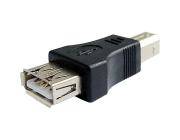
The speech can be triggered by the Gate signal, pressing the rotary or by pressing Enter on the keyboard.
Basic editing is possible with the backspace character while the Escape key is erasing the current text.
There is also a gate out signal on the Busy/Aux jack that stays up while the keyboard is pressed (it is not needed for the speech but I thought it could be fun to use it)
The newer version of Emy’s PCB 1.0c allow powering the keyboard but If your PCB is 1.0b you will need to apply the following hack.
- Add a Schottky diode (like the BAT85) between the +5v via end the USB connector like shown here :

- Be careful not to overheat the via while soldering it.

- Do not use this port to power something else than a normal keyboard. The maximum current that can be provided is 300 ma.
Enjoy your new talking keyboard!
This works great with wireless keyboards too and allows triggering the speech from quite a distance.
