SPO vox sustain allophones in phonetic files

Adding a duration marker to alter the normal duration of the allophone.
Here is the syntax to use in your .spo file : (add a + marker and the duration in milliseconds)

technology: \TT1 \EH +500 \KK1 \NN1 \AA +200 \LL \AX +200 \JH \IY
mathematics: \MM \AE \TH \AX \MM \AE \TT1 \IH \KK1 \S
spacecraft: \S \PP \EY \S \KK1 \RR2 \AE \FF \TT1
electronic: \IH \IH \LL \EH \KK1 \TT1 \RR2 \AA +200 \NN1 \IH +200 \KK1
electronic: \IH \IH \LL \EH +400 \KK1 \TT1 \RR2 \AA +800 \NN1 \IH +500 \KK1


SP0256-017 says some numbers and plays little melodies

I just received an SP0256-017 purchased on Ebay as the one on this picture from Flickr.

SP0256-017 Speech Synthesis Chipset (Mint In Box!), 1983

This version of the SP0256 was designed for talking clocks. I work with the help of a dedicated EPROM which hold the code for the numbers (without the EPROM, it can say the numbers from 0 to 10 but then it hangs). This version cannot says the allophones as it’s bigger brother the SP0256-AL2 variant

I found the data sheet here but the quality of the scan is quite poor. I used the schematics from the SP0256 to understand what to do.

The sound are quite funny and I couldn’t resist posting a little message just to let you ear this chip.

Oh Eighteen
One Nineteen
Two Twenty
Three Thirty
Four Forty
Five Fifty
Six It is
Seven A.M.
Eight P.M.
Nine Hour
Ten Minute
Eleven Hundred Hour
Twelve Good Morning
Thirteen Attention Please
Fourteen Please Hurry
Fifteen Melody A
Sixteen Melody B
Seventeen

Melody C

I just coded a loop to ear this table.

/* SP0256-017
 * demo all 36 sounds
 */

// Arduino - SPO
// Pin 9   -  8
// Pin 10  -  20
// Pin 0,7 - Datas
 
#define SBY 9
#define ALD 10

void setup()
{
  
  for (int p=0; p<=8; p++) {
    pinMode(p, OUTPUT);
  }
  
  pinMode(ALD, OUTPUT);
  pinMode(SBY, INPUT);
  
  digitalWrite(ALD, HIGH);
}

void loop()
{
  for (int p=0; p<=36; p++) {
   
    PORTD = p;
    // Set !ADL=0 for 2usec to tell the chip to read
    digitalWrite(ALD, LOW);
    delayMicroseconds(2);
    digitalWrite(ALD, HIGH);
   // Wait for SBYto comme to 1 (standby) to indicate chip is done speaking
    while (digitalRead(SBY) == 0);
    
    delay(100);
    }
    
   delay(2000); // delay 2 sec between test
}


SP0256-AL2 pitch control

I always wanted to have some fun with the SP0256’s pitch.

I started to change the crystal with some I had lying around. (2.4576 MHz, 3.2768 MHz, 4.0000 MHz)
The SP0256 worked just fine at these frequencies (Follow the links to hear some samples)

Eric Archer describes a nice application where the crystal is replaced by a VCO. I wanted to do the same by driving an oscillator with my Arduino.

I found how to use a programmable oscillator (LTC6903) with an Arduino http://eastco-inc.com/

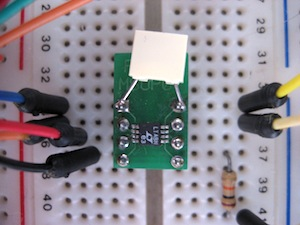
Part of the problem is the size of this chip (4x3mm !)

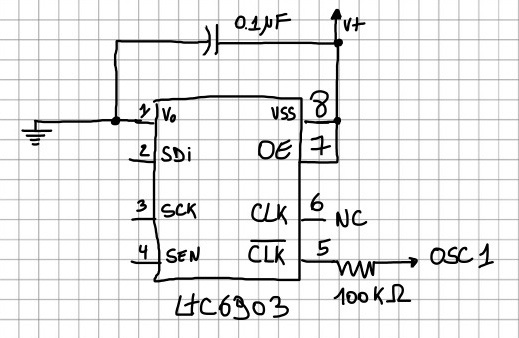
I had to install it on an adapter breadboard to hook it to the Arduino according to this wiring. (to connect it to the SP0256 was another problem. See later)

The LTC6903 chip has a different range of frequencies and one exactly fit the SP0256 range or limits (see page 7 from the datasheet) You just need to pass the correct parameter to the chip
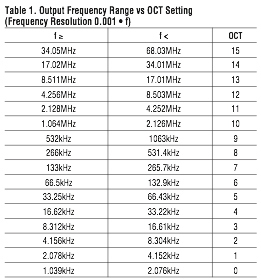
Now to get it to the SP0256 was a problem at higher frequencies (around 4MHz). The chip started to produce hiss and stalled. I knew that by using a crystal I could go up to 4MHz so I had to search a bit. After many (hours) of trials and errors and lost of readings

http://www.phaselink.com/pdffiles/PAN0704111%20-%20Replacing%20Crystals%20and%20Oscillators.pdf

I learned that I could do an AC coupling.

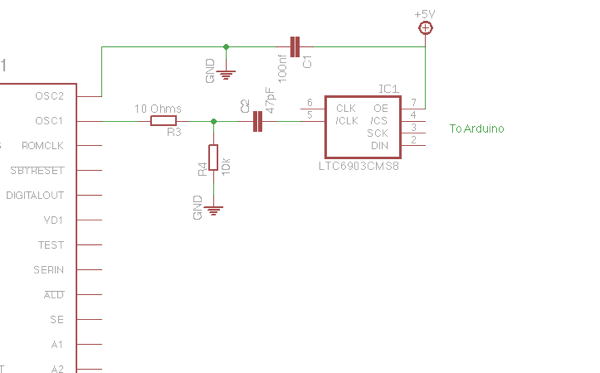
Here is the final schematic working up to 4.252 MHz. Note that I use the “negative” /CLK from pin 5. Using the positive CLK from pin 6 stall the SP0256 at higher frequencies. (can anybody help me on this?) Keep the wire short and don’t forget the usual 0.1 µF decoupling cap. Feed the signal to the SP0256’s OSC1 and put OSC2 to the ground.


Il you want to hear the SP0256 saying random phoneme at various pitches (from 1.064 MHz to 4.252 MHz:: reading a pot value and sending them to the LTC6903 while the SP0256 speaks), just follow this link)


SP0256 Speaks !

Back to vintage ’80 robotic sounds
I had a SPO256-AL2 on a 1989 circuit designed to act as a vocal printer.
I decided to hook it to my Arduino Mega.
With the help of various ressources I got it working whithin an afternoon