Updating the shop

As you may have noticed, I am busy merging the old blog into a more user-friendly shop.

I still have a lot to do to merge the old blog pages and the products pages.

The goal is to let you understand better all my products and how to use them.

I know the documentation isn’t always as expected, but I keep editing it with your feedback.

Thanks for your patience


Emy’s ecosystem

HardwareFeaturesFirmwareStatusTodoBuy
Emy 2018Emy emulates the famous TMS5220/TMS5100 speech chips and read the LPC compressed data from the SD card to allow infinite vocabulary !
Emy QC
20/10/2019

ver. 1.2


Emy 2018 firmware
13/01/2023

ver. 1.5

StableText-to-speech from SD
Emy 2019Same as Emy 2018
USB keyboard support
Generic panel to support additional speech synth.
Emy QC
20/10/2019

ver. 1.2


Emy Firmware
27/01/2024

ver. 2.6b

StableText-to-speech from SDBuyNow
Emy + Kaiwa-voxRobotic voice Japanese text-to-speech. Reads Romaji text from the SD card.
Kaiwa Firmware
22/01/2023

ver. 2.3

StableUSB Keyboard text entryBuyNow
BuyNow
Emy + VAX-voxDectalk text-to-speech.
Reads plain English from the SD card and from the USB keyboard
Vax Firmware
08/02/2023

ver. 0.34

BetaBuyNow
Emy + Mea-voxvintage MEA8000 French speech chip (Formant generator)
Text-to-speech from SD card and from the USB keyboard
Mea Firmware + MIDI USB
08/05/2022

ver. 0.6

AlphaBuyNow


Use a USB keyboard for text entry

Use a standard USB keyboard to enter some text and have it spoken live on VAX (soon on Kaiwa and Emy).

The keyboard is connected to a USB gender changer (provided with the last edition of Emy ) which also powers the keyboard.
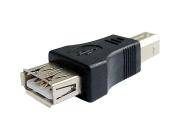
The speech can be triggered by the Gate signal, pressing the rotary or by pressing Enter on the keyboard.
Basic editing is possible with the backspace character while the Escape key is erasing the current text.

There is also a gate out signal on the Busy/Aux jack that stays up while the keyboard is pressed (it is not needed for the speech but I thought it could be fun to use it)

The newer version of Emy’s PCB 1.0c allow powering the keyboard but If your PCB is 1.0b you will need to apply the following hack.

  • Add a Schottky diode (like the BAT85) between the +5v via end the USB connector like shown here :

  • Be careful not to overheat the via while soldering it.
  • Do not use this port to power something else than a normal keyboard. The maximum current that can be provided is 300 ma.

Enjoy your new talking keyboard!

This works great with wireless keyboards too and allows triggering the speech from quite a distance.


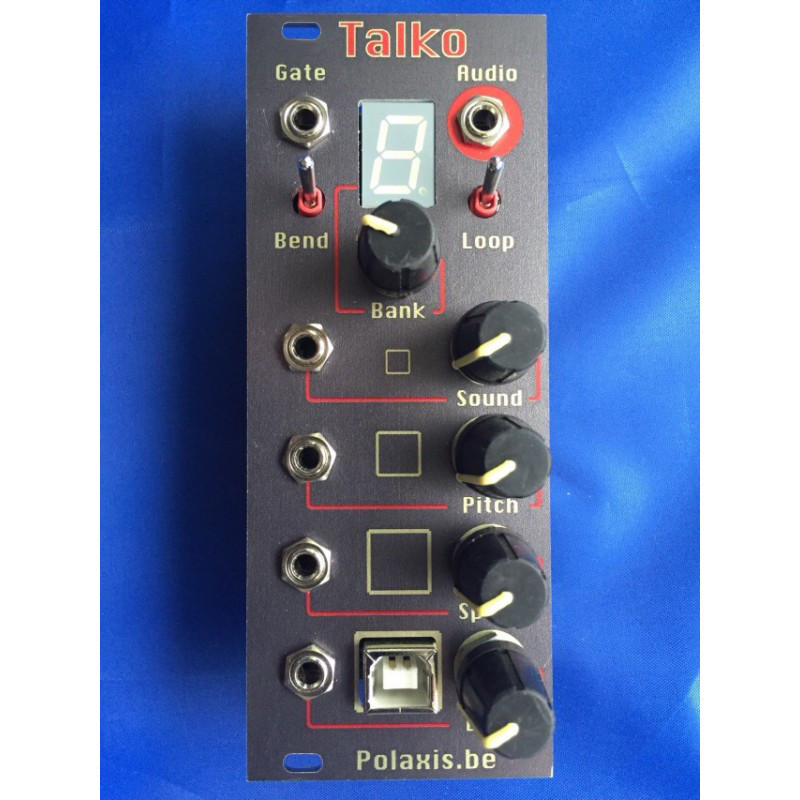

Talko Eurorack countdown timer

Here is a little countdown timer I developed for Hataken to help in timing mini gigs.

It work like this :

  1. Choose the amount of time from 0 to 19 minutes with the BANK knob.
  2. Start the timer with a gate signal  or by pressing the rotary switch.
  3. The display will countdown and  blink once per second until the end of the timer.
  4. A the end of the timer, the BEND  signal will go high (4.5V max, if  the BEND knob is fully turned clockwise) and the alarm will ring if the bend  switch is ON

While running you can :

  • Run silently (mode switch UP),
  • Tick every second (mode switch NEUTRAL),
  • Tick  and have the minutes left spoken (mode switch DOWN).
  • Use the BEND switch to set or mute the alarm sound
  • Stop the timer by pressing the rotary switch (or using a Gate signal to do so)

Note : The SOUND and BEND pots are not used

Here is how it sounds like :


The code is available here : talko_timer_Hataken.hex

Right click to save it as a .hex file and use Easy uploader to install it into Talko.
The next iteration will have an interface with Processing to display the countdown on a big display.


Online Store

Polaxis has now an online shop : Please visit this page to grab my latest modules assembled or as DIY kits

talko (2)