Teletype
Hands-on MIDI control for Kraftor
Teletype puts five keys and four knobs within reach of your next synthetic voice performance. Designed as a compact companion for Kraftor, it lets you trigger sounds, recall phrases and adjust voice parameters through MIDI.
Two slide switches select four banks, giving you 20 assignable note slots across the five keys. Each knob can send a MIDI Control Change message or pitch bend. Choose your mappings in the browser configuration app and save them on the controller.
Play your voice engine

For a live speech setup, assign five keys to the MIDI notes that trigger your chosen phonemes, allophones or stored phrases. Switch banks to reach another set of five. Map the knobs to supported parameters such as pitch, speed or modulation, then shape the voice as you play. Available sounds and parameters depend on the voice board and firmware installed in Kraftor.
Both Teletype’s MIDI output and Kraftor’s MIDI input use 3.5 mm TRS MIDI Type B. Connect them with a 3.5 mm TRS cable, and power both devices by USB. Once your mappings are saved, a computer is not needed for performance.
Five keys, four knobs, your mappings
- 5 hinged keys: assign a MIDI note to each key in each of the four banks.
- 2 bank switches: select one of four banks, for 20 note assignments in total.
- 4 knobs: individually assign MIDI CC or pitch bend.
- USB MIDI and 3.5 mm TRS MIDI Type B output: control compatible software or hardware instruments.
- Independent MIDI channels: choose one channel for the keys and another for the knobs, each from 1 to 16. Both groups can also use the same channel.
- Browser configuration: choose your mappings in Chrome or Edge and save them on Teletype.
- USB-C power: in a 3D-printed enclosure, available in seven colours.
The keys send short note triggers. Holding a key does not sustain a note. Teletype is a MIDI controller and produces no sound on its own.
Configure, save, then play
Use the Configure tab in the browser interface to assign notes, knob functions and MIDI channels, then save your settings on Teletype. Saved settings are retained when the power is turned off. After setup, you can close the interface and play without it. For hardware control through 3.5 mm TRS MIDI Type B, no computer is needed: power Teletype by USB and connect it to your MIDI instrument.
The optional Monitor view shows incoming MIDI messages and knob values while you play. Reopen the app whenever you want to change your settings or see this feedback.

Beyond Kraftor
Use Teletype with a DAW, sampler or another MIDI instrument that responds to note triggers, CC messages or pitch bend. Match the receiving instrument’s MIDI channel and mappings to the controls you want to use.
Firmware, configuration and documentation
Open the Teletype browser interface in Chrome or Edge to configure your controller or monitor incoming MIDI. Source code, setup instructions and build documentation are available in the TeleTypeController GitHub repository.
Update without compiling
Download Teletype v1.0.1 UF2 firmware, then open the RP2040 browser firmware uploader in Chrome or Edge and follow its steps. No compilation is required. Use the Teletype firmware file for this controller.
If you prefer to build the firmware yourself, follow the instructions in the GitHub repository above.
Choose your colour
Available in red, beige, black, white, blue, green and orange. Select your preferred colour when ordering. The product photos show the blue version.
Weight and dispatch
Product weight: 160 g. Ships from Belgium.
Design credits
The key and hinge geometry was inspired by Adafruit’s USB MIDI Keyset by the Ruiz Brothers and remodelled for Teletype. Teletype is a Polaxis product.
Talko 2 Eurorack
Description
Talko2 is a compact, DIY-friendly Eurorack speech module built on the same proven engine used across the Polaxis lineup.
In homage to Error Instruments, the glitch button is named Error, unlocking wild and unpredictable textures.
It speaks numbers, alphabets, phonemes, and classic phrase banks, all with real-time control over pitch, speed, and effects.
A 7-segment display shows the active bank or the selected effect.
Designed for experimental voices and robotic sound design, Talko2 is both a classic speech engine and a versatile creative tool.
Technical details
- Firmware update: UF2 drag-and-drop using a USB-C data cable.
- CV range – Sound, Speed, Pitch and FX: 0–3.3 V. Higher positive voltages are clipped at 3.3 V; inputs tolerate up to +10 V.
- Sound CV: Linearly selects the sounds within the active bank.
- Pitch CV: Controls speech pitch without calibrated musical scaling; does not follow 1 V/octave.
- Gate input: Positive gate signals; 0–5 V recommended. Accepts up to +10 V.
- Input protection: Resistors and clamping diodes protect the analogue CV inputs; the gate input uses a transistor buffer.
- Current consumption: Approximately 20 mA.
- Power: Standard Eurorack ±12 V supply through a 10-pin header.
- Width: 18 HP (approximately 91 mm).
Quick Start
- Connect the audio output to your mixer or modular system.
- Patch a gate signal into the Gate input (or press the Gate button)
- Turn the Encoder to select a speech bank (shown on the 7-segment display).
- Use the Sound knob to pick the item (digit, letter, word, phoneme).
- Adjust Speed and Pitch to taste.
- Push the encoder and turn it to select an effect, and use the FX knob to adjust its depth


Media
Talko 2 Terminal
Description
Talko Terminal uses the same proven and highly successful enclosure as the Emy Terminal, offering a compact, robust, and DIY-friendly design.
Inside, it is the same PCB as the Eurorack version, but the Terminal format adds several advantages:
-
USB power available on the back
-
Direct computer communication (serial, and potentially MIDI in future updates)
-
No need to open the case for firmware upload—connect via USB and upload the UF2 file using our custom uploader.
Talko speaks numbers, alphabets, phonemes, and classic phrase banks, with real-time controls for pitch, speed, and effects.
A 7-segment display shows the active bank or effect.
Designed for experimental voices and robotic textures, Talko2 combines a classic speech engine with a modern sound-design toolset.
Technical details
- Firmware update: UF2 drag-and-drop using a USB-C data cable via the rear port, without opening the enclosure.
- CV range – Sound, Speed, Pitch and FX: 0–3.3 V. Higher positive voltages are clipped at 3.3 V; inputs tolerate up to +10 V.
- Sound CV: Linearly selects the sounds within the active bank.
- Pitch CV: Controls speech pitch without calibrated musical scaling; does not follow 1 V/octave.
- Gate input: Positive gate signals; 0–5 V recommended. Accepts up to +10 V.
- Input protection: Resistors and clamping diodes protect the analogue CV inputs; the gate input uses a transistor buffer.
- Current consumption: Approximately 35 mA at 5 V.
- Power: USB-C.
Quick Start
- Connect the audio output to your mixer or modular system.
- Patch a gate signal into the Gate input (or press the Gate button)
- Turn the Encoder to select a speech bank (shown on the 7-segment display).
- Use the Sound knob to pick the item (digit, letter, word, phoneme).
- Adjust Speed and Pitch to taste.
- Push the encoder and turn it to select an effect, and use the FX knob to adjust its depth


Open Console
Drive visual effects directly from Talko via USB serial or USB MIDI. Runs in your browser; no download or installation required.
Media
Kraftor Speaker

USB Y splitter

6 way jack connector
Passive 6-Way Signal Distributor for Mono signals
Usb to jack 2.1 power cable
0.5m power cable to power the Bricky modules from a USB bank or a power supply
Talko 2 Bricky
Description
This module directly benefits from all these developments: a compact, DIY-friendly design, available both as a Eurorack module and as a standalone “Bricky” format inspired by Error Instruments. In homage, the glitch button has been renamed Error.
It speaks numbers, alphabets, phonemes, and classic phrase banks, with real-time pitch, speed, and effect controls.
A 7-segment display shows the active bank or the effect applied.
Designed for experimental voices and robotic textures,
Talko2 is both a classic speech engine and a sound-design tool.
Technical details
- Firmware update: UF2 drag-and-drop using a USB-C data cable.
- CV range – Sound, Speed, Pitch and FX: 0–3.3 V. Higher positive voltages are clipped at 3.3 V; inputs tolerate up to +10 V.
- Sound CV: Linearly selects the sounds within the active bank.
- Pitch CV: Controls speech pitch without calibrated musical scaling; does not follow 1 V/octave.
- Gate input: Positive gate signals; 0–5 V recommended. Accepts up to +10 V.
- Input protection: Resistors and clamping diodes protect the analogue CV inputs; the gate input uses a transistor buffer.
- Current consumption: Approximately 35 mA at 5 V.
- Power: 5–12 V DC through a 2.1 mm centre-positive barrel connector.
Quick Start
- Connect the audio output to your mixer or modular system.
- Patch a gate signal into the Gate input (or press the Gate button)
- Turn the Encoder to select a speech bank (shown on the 7-segment display).
- Use the Sound knob to pick the item (digit, letter, word, phoneme).
- Adjust Speed and Pitch to taste.
- Push the encoder and turn it to select an effect, and use the FX knob to adjust its depth
Media
Aria (firmware)
Installation
Proceed like a purchase (this is a Free downloadable product)
1.Save the firmware file to an SD card with a name like “Aria.bin”.
2.Load it from the Code > Flash menu.
3.The firmware will be copied as “firmware.bin”, and the system will reboot.
4.The original firmware file remains on the SD card under its own name.
This process works for EMY, Mea, Kaiwa, Sino, and Vax, allowing easy switching between firmwares.
Main Menu
Vowel
Use the main switch to change the desired mode :
•Trigger Mode – When triggered by the gate, vowels play for their entire frame duration.
•Gate Mode – Vowels play only while the gate is high and stop when low.
•Continuous Mode – Vowels loop seamlessly, with transitions affected by frame and merge duration.
Parameters
• P1 – Sample Rate
• P2 – Master Pitch
• P3 – Frame Duration
•P4 – Merge Duration (smooth transitions between vowels)
• P5 – Noise Level
• Sound – Choose Vowel to play
Code
•Code Display – Shows the current firmware version.
•Calibration – Potentiometer calibration tool.
•Flasher – Firmware loader to select and install different firmware versions.
Demo
Kraftor Performer
Designed with you. Built around Kraftor.
Kraftor Performer is a family of custom speech instruments and MIDI controllers built around Kraftor. Each instrument is developed with you around the way you want to perform, play or interact with synthetic speech.
A project starts with a conversation about your ideas, your setup and the controls you want within reach. The resulting instrument can be a hands-on stage device, a MIDI-controlled voice instrument, an installation or a combination of these approaches.
A design shaped around your workflow
- Voice engine: choose a compatible speech engine and the voice characteristics that suit your project.
- Controls: decide on the buttons, knobs, bank selectors and other performance controls needed for your workflow.
- Display: choose the size and type of display, including a larger display for easier reading during concerts.
- Connections and interaction: plan MIDI control, USB keyboard entry, NFC phrase loading or other supported functions around the chosen hardware and firmware.
- Enclosure, materials and colour: develop the form, finish and visual identity of your instrument.
- An evolving design: where appropriate, the hardware can use a modular tile system inspired by Xavier Garcia at Hackin’Toys and the reusable, interchangeable design principles of OpenStructures. Controls, labels, displays and utility modules can be arranged around your workflow and adapted later for a new setup, repair or upgrade.
Built to order, quoted for your project
Price on request. The configuration, price and lead time are agreed after discussing the design and scope. The images and demonstrations show examples of what can be built. Each Kraftor Performer has its own agreed specification.
Different instruments, designed around you
Kraftor Performer can bring the voice engine and controls together in one complete instrument, or take the form of a separate custom MIDI controller for Kraftor. A separate controller connects through 3.5 mm TRS MIDI Type B.
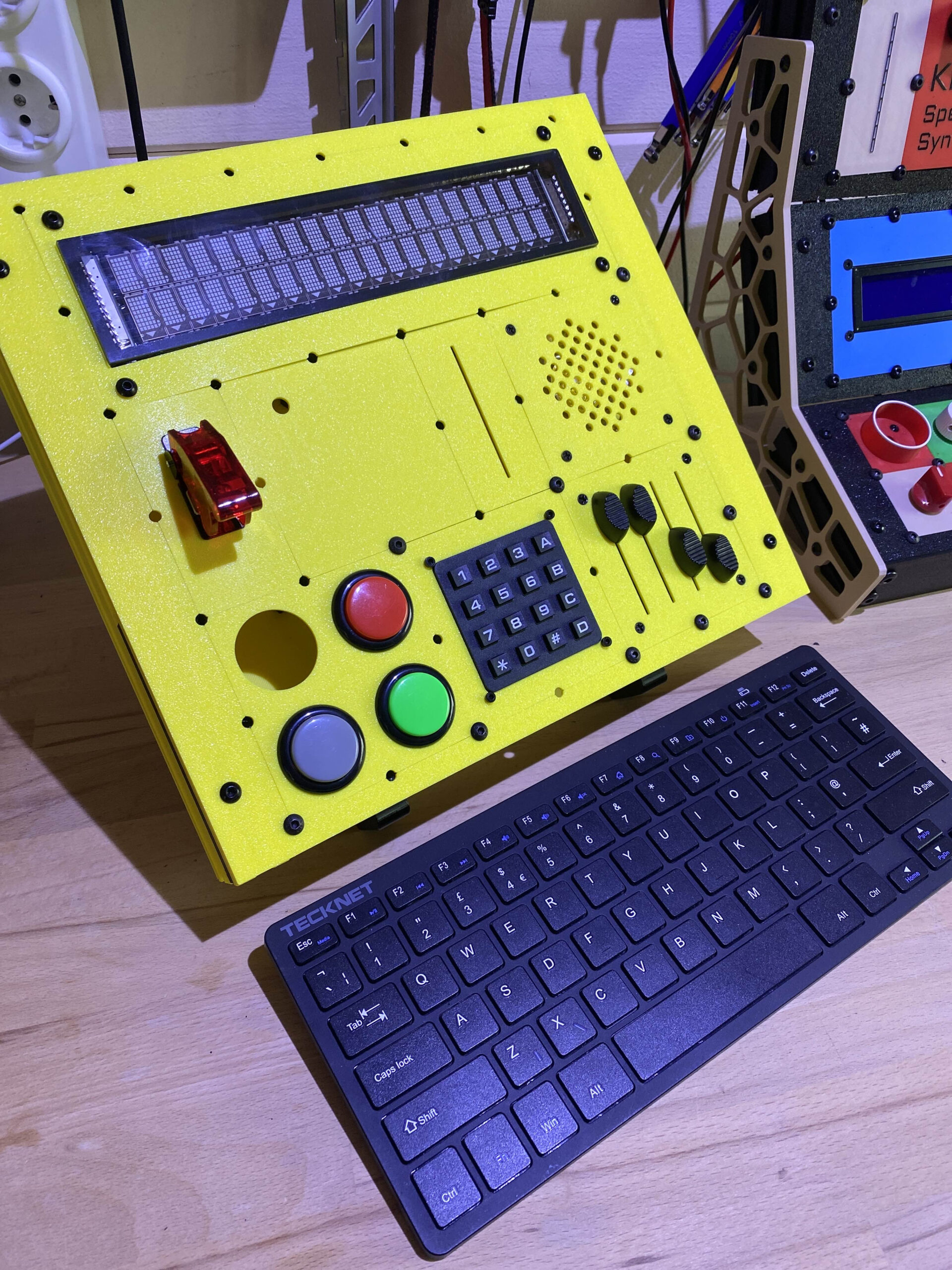
The examples below show two approaches: an integrated instrument and a modular controller with its own arrangement of buttons, keypad and knobs. A USB keyboard can be included where useful; it is an optional part of the design.
-

- An example of a custom instrument with the voice engine and performance controls integrated into one enclosure.
-

- An example of a separate custom MIDI controller, designed around the player’s preferred controls.

SpeakJet example: a separate controller driving Kraftor
This short demonstration shows a custom MIDI controller playing Kraftor with a SpeakJet voice board. It is one example of how the controls can be arranged around a particular way of performing.
Example build: Nexus voice with NFC phrase loading
This standalone performance configuration is one example of a Kraftor Performer. The following features and controls describe this build; other versions can use a different layout and feature set.
Example performance features
- Real-time text-to-speech: type on a connected USB keyboard and press Enter to speak, or load prewritten lines from an NFC tag and trigger them from the front panel. No computer is required for this standalone workflow.
- Live pitch and speed control: adjust the voice while a phrase is playing. Four banks and five buttons provide 20 sentence slots. Button presses are ignored while the unit is already speaking.
- NFC as set-list media: place a tag on the reader to load its phrases. Reading can take a few seconds. The first line is the title shown on the display; the following lines become the phrases assigned to buttons and MIDI.
- Selectable Nexus voices: use keyboard function keys F1-F10 to choose voices such as Perfect Paul, Vader and Big Bob. Voice changes can be issued while speaking.
- MIDI control: trigger stored sentences with MIDI notes and control pitch and speed through MIDI CC messages.
Controls on this example build
- NFC reader: positioned to suit the enclosure and performance setup.
- Two potentiometers: pitch and speed. At power-up, move each knob once so the device learns its position. Loading a new NFC tag does not reset pitch or speed.
- Four-position bank selector and five tactile buttons for triggering sentences across the banks.
Start with your idea
Describe how you want to use the instrument, which controls matter to you and how it should fit into your setup. These details form the starting point for a design and quotation.
Kraftor
Introducing Kraftor, the newest addition to Polaxis’s lineup, engineered to enhance your speech synthesis projects.
This versatile host system for our voice boards eliminates the need for a Eurorack. It connects seamlessly to your computer, giving you direct access to a world of auditory creation.
Whether generating text-based speech or crafting unique sounds via MIDI or Serial inputs, Kraftor’s flexibility and performance are designed to meet your creative needs.
Specifications:
– CPU: SAMD21 ARM® Cortex®-M0+ running at 48 MHz.
– USB Connectivity: for power, software updates, MIDI control, and serial communication.
– MikroBUS Port: for easy addition of hardware synthesizers.
– Built-in 3-watt amplifier with volume control: Ensures a clear and robust output, making Kraftor ideal for standalone use or as a speaking device to assist the visually impaired.
– MIDI Control: Through a 3.5 mm TRS MIDI Type B input or USB MIDI for precise voice and sound modulation.
– Serial Control: Allows for unique ‘talking printer’ capabilities.
– Non-Volatile Storage: 32 KB on-board FRAM (high-speed, permanent memory that allows storing pages of text).
– Channel Settings: Easily adjustable via onboard switches.
– Power: USB powered for convenience and mobility.
– Output Ports: Includes external Speaker 3.5 mm jack (with volume control) and a Line level audio out 6.35 mm Jack.
– PCB Dimensions: 10×6 cm.
– Grove Connector: for further I2C connectivity (OLED, sensors,…). Includes an I2C isolator.
Kraftor’s design prioritizes ease of use and flexibility. It features a straightforward interface with USB connectivity for all functionalities.
While Kraftor includes a built-in amplifier for clear output, the focus is on its flexibility and compatibility with Polaxis voice boards, which are designed to meet the diverse needs of creators and innovators.
Whether used for music production, interactive installations, or educational tools, Kraftor is ready to bring your ideas to life with remarkable accuracy and flexibility.
Rediscover the roots of speech synthesis with Kraftor – your computer’s new voice companion, bridging the legacy of classic speech chips with your contemporary creativity and innovation.
Phonetic engines
(Builds speech by sequencing phonemes via MIDI)
Speakjet

Kraftor SpeakJet MIDI
This firmware lets you trigger the
SpeakJet's allophones and built-in sound effects from MIDI notes, and control volume, pitch, and bend/speed parameters
from MIDI messages.
SpeakJet's allophones and built-in sound effects from MIDI notes, and control volume, pitch, and bend/speed parameters
from MIDI messages.
SPO vox
Kraftor SPO vox MIDI
This firmware drives a SP0256-AL2 allophone chip and accepts control over USB MIDI or the hardware serial MIDI input.
Mea vox
(coming soon ..)
Robotrax emulator
(coming soon ..)
Robovox
Kraftor Robovox MIDI
This firmware allows Kraftor to fully control the Votrax SC02 hosted on Robovox via MIDI.
Text to speech engines
(Normal text is stored in memory and triggered live)
Sino vox
Kraftor SinoVox
Kraftor Sinovox is firmware for
driving a SinoVox speech module. It accepts Pinyin or English text over USB serial and a graphic user interface, stores sentences in RAM or optional I2C FRAM, and recalls them from USB MIDI or TRS MIDI.
driving a SinoVox speech module. It accepts Pinyin or English text over USB serial and a graphic user interface, stores sentences in RAM or optional I2C FRAM, and recalls them from USB MIDI or TRS MIDI.
Kaiwa Vox
Kaiwa Serial MIDI for Kraftor
Type Japanese in romaji with Kaiwa Designer, store phrases in RAM or FRAM, and trigger speech through USB MIDI or TRS MIDI. Firmware, browser app and instructions.
SAM emulator
Kraftor SAM Serial MIDI
This is an emulation of the SAM Software Automatic Mouth text-to-speech firmware for Kraftor. It reads typed text over USB Serial, stores phrases in RAM and optional RC256 FRAM, and lets you trigger stored phrases or shape the voice via USB MIDI or the hardware serial MIDI input.
Nexus vox
Nexus Serial Midi for Kraftor
This firmware allows Kraftor to trigger Nexus speech from MIDI. The sentences are edited and stored in Kraftor using a serial terminal software.MIDI notes are used to trigger the sentences.
Vax Vox

VAX USB keyboard reader
Generate speech directly from a compatible USB keyboard. Sentences are typed and edited with the help of the LCD Screen
Vax Serial Midi for Kraftor
This firmware allows Kraftor to trigger VAX speech from MIDI. It is designed to trigger sentences via MIDI notes. The sentences are edited and stored in Kraftor using a serial terminal software.
Media