Kaiwa Panel
See the assembly manual
See the assembly manual
Robovox’s design is inspired by the Patent “System for and method of synthesizing singing in real-time” filed on 03.05.90 by Florian Schneider, Gert Joachim Ott, and Gert Jalass.
It describes a musical instrument that can produce a speech and sing in real-time via MIDI controls.
A magical speech synthesizer chip lives at the heart of the instrument: the Votrax SC-02 invented by Richard T. Gagnon.
The Votrax SC-02 chip can generate speech by stringing phonemes together.
The Votrax SC-02 contains registers that allow software control of the speech rate, pitch, pitch movement rate, amplitude, articulation rate, vocal tract filter, and of course, phoneme selection.
Most of these functions are implemented in the MIDI control software.
In Robovox, we also implemented an undocumented function of the chip: the internal audio carrier can be replaced by an external one to produce vocoder-like effects.
The result is simply excellent. You can also use this feature as an effect to apply to the carrier! Check this demo where I play with the pitch of the external carrier with a Genki ring (@ 0:48) (sorry for the lousy audio -video sync)
The code runs on Terminal or Emy. It comes in 2 versions, depending on how you want to sequence it. You can drive it either as a USB MIDI instrument or via a classic MIDI serial TRS connector. The code also allows CV controls so it can be used in a Eurorack setting
The chip is quite easy to sequence with the help of a plugin that works almost like the original Atari software used by Kraftwerk.
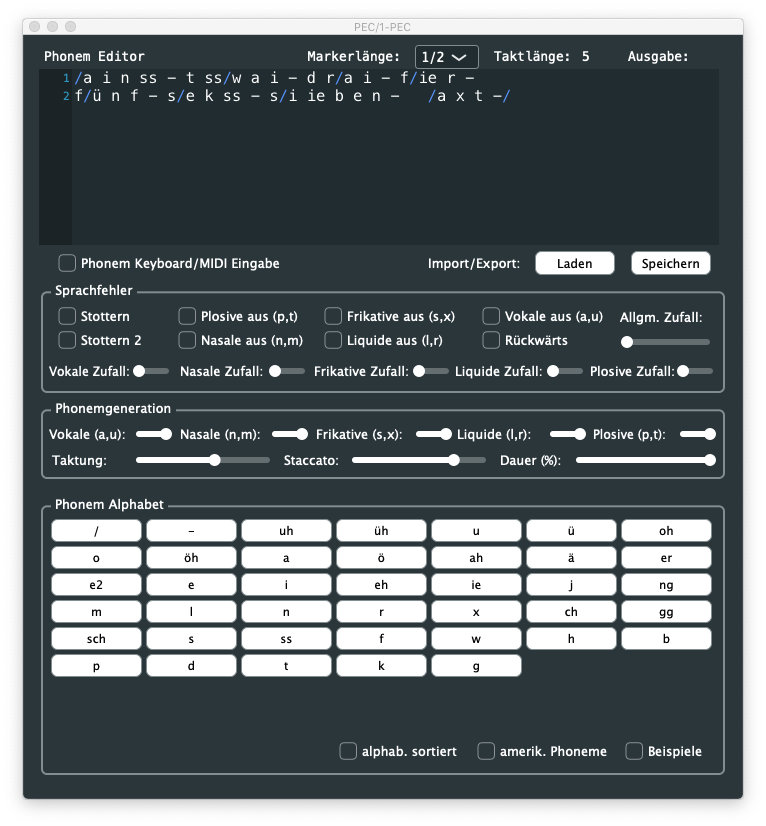
You can also sequence the chip by sending phonemes from the piano roll (here: UH R A N E U M ) 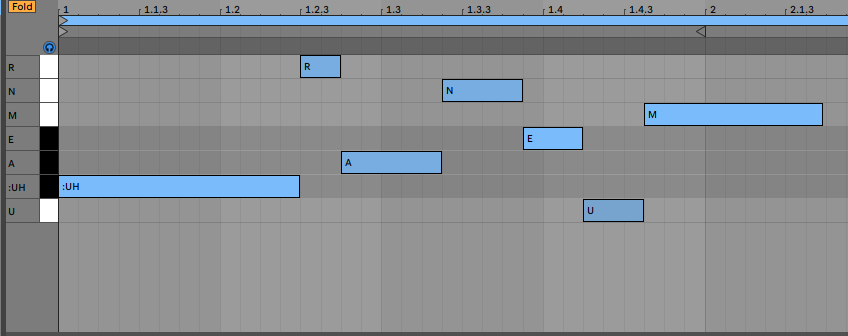
I made a MIDI effect rack for Ableton to simplify the introduction of text
Here are a few Kraftwerk covers made by Andrew Shaw. These are astonishing variants of the original ones: respectful to the original songs but with their specificities or identities.
Andrew is using the Robovox precisely as Kraftwerk used to do: first by finding the correct phonemes to be uttered, then launching them in perfect timing and duration, and finally tuning the pitch to have the chip sing in tune!
( all parameters sent live to the Robovox from within the DAW)
The casing allows adding any of the Vox modules inside just by removing four screws.
As with Emy, Terminal can be used in a CV-controlled environment or act as a MIDI instrument.
You can install the various firmware on the SD card before powering the device.
A pair of shunts allows the user to connect Terminal either as a MIDI USB unit or as a host for a USB keyboard for text entry.
On request, a serial TRS jack MIDI Type B connector can also be added.
(note: not all firmware are supporting MIDI yet. MIDI support is under development)
Please check this page for more information: https://www.polaxis.be/

Features :
 100 % Emy compatible, including adding additional voices
USB port for power or MIDI or USB connection
Optional TRS jack MIDI Type B connector
USB host connector for computer keyboard
Shunts (must be removed when connecting a keyboard, otherwise, they must be placed vertically)
Line in & out stereo jack 1/4″ (line in only used for the Robovox module)
Trimpot to adjust the audio level input (only used for the Robovox module)
See the assembly manual
Dectalk was a speech synthesizer and text-to-speech technology developed by Digital Equipment Corporation in 1984, mainly based on the work of Dennis Klatt at MIT.
The Dectalk Express what connected to the serial port and would speak what was being “printed.”
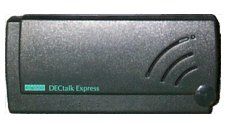
The synthesizer can process text and produce speech with nine different voices. The Dectalk engine includes a parser that gives users fine control over the synthesized speech’s quality, pitch, and intonation. Dectalk can also be programmed to play phonemes and sing with quite a realistic expression.
[hxae<300,10>piy<300,10> brr<600,12>th<100>dey<600,10> tuw<600,15> yu<1200,14>_<120>]
[hxae<300,10>piy<300,10> brr<600,12>th<100>dey<600,10> tuw<600,17> yu<1200,15>_<120>]
[hxae<300,10>piy<300,10> brr<600,22>th<100>dey<600,19>xdih<600,15>rdeh<600,14>ktao<600,12>k_<120>_<120>]
[hxae<300,20>piy<300,20> brr<600,19>th<100>dey<600,15> tuw<600,17> yu<1200,15>]
The command syntax for musical coding sequences is:
[phoneme<duration, pitch numberLatency
There is a latency of 200 ms between the trigger and the start of the speech. This latency is very consistent, allowing the speech to stay in the tempo even if not precisely on the beat. The firmware uses the gate going down to stop the speech, preparing the chip for the next utterance, so when sequencing some stutter-like speech in a loop, they still fire up in sync with the tempo.
Real-time
The various voice parameters are applied just before triggering the speech and are ineffective while speaking. They are applied to the next utterance. The best is to fiddle a bit with the knobs for the desired effects.


See the assembly manual
Prepare your text file in Romaji and have Kaiwa read it out loud for you!
Just in case you wonder how Romaji look like: here is the Japanese lyrics of Kraftwerk’s Radioactivity :
cherunobuiri
harisuba-gu
serafi-rudo
hiroshi-ma
fukushi-ma
nihon,demo,houshanou
kyoumo,itsumademo
fukushima,houshanou
kuuki,mizu,subete
nihon,demo,houshanou
i-ma--sugu,ya-mero-
note: the hyphen is used to prolong the vowels (see the Kaiwa-vox’s manual for more on this)
Group your lines into a song and save it as a text file on the SD card :
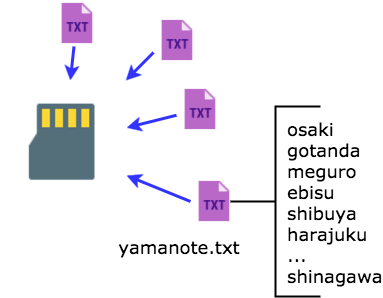
On Kaiwa, manually pick a song and use the Sound pot or its CV entry to pick the line in that song.
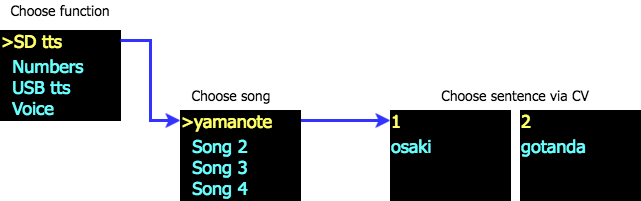
A gate signal will trigger the sound while the various pot and CV entries allow tweaking the voice characteristics before processing the speech (not in real-time, but they are applied on the next utterance).
(if you need to get started with a new sd card)
This little demo to shows how to use the USB TTS mode on Kaiwa. This function is designed to help you debug your Japanese romaji lines before storing them into a text file for the SD card. (see the user manual for more details).
The speech is triggered by the gate signal, so this mode can also be used to edit and play live text.
(if you need to get started with a new sd card)
The MIDI version of the code (see above in Firmware) works great with this Ableton preset file

https://www.youtube.com/embed/JkEYwAl6exk
//platform.instagram.com/en_US/embeds.js
//platform.instagram.com/en_US/embeds.js
