Aria (firmware)

Installation

1.Save the firmware file to an SD card with a name like “Aria.bin”.

2.Load it from the Code > Flash menu.

3.The firmware will be copied as “firmware.bin”, and the system will reboot.

4.The original firmware file remains on the SD card under its own name.

This process works for EMY, Mea, Kaiwa, Sino, and Vax, allowing easy switching between firmwares.

Main Menu

Vowel
Use the main switch to change the desired mode :

Trigger Mode – When triggered by the gate, vowels play for their entire frame duration.

Gate Mode – Vowels play only while the gate is high and stop when low.

Continuous Mode – Vowels loop seamlessly, with transitions affected by frame and merge duration.

Parameters

P1 – Sample Rate

P2 – Master Pitch

P3 – Frame Duration

P4 – Merge Duration (smooth transitions between vowels)

P5 – Noise Level

Sound – Choose Vowel to play

Code

Code Display – Shows the current firmware version.

Calibration – Potentiometer calibration tool.

Flasher – Firmware loader to select and install different firmware versions.

Demo

View this post on Instagram


S.A.M (firmware)

Read texts from the micro SD card in plain English.
The sound produced by S.A.M is a robotic, monotone voice with a slightly metallic quality.

The user can adjust the Pitch, Speed, Mouth, and Throat.

Note that the code is blocking, and the potentiometer positions are read during the pauses between utterances.
(only the Rate P1 can be used in real-time)

S.A.M. user Manual

QR Code

SAM can read .txt file
You can try this file as an example.

Installation

Save it on the SD card with a name like “SAM.bin,” and you can load it from the code>flash menu.
The same applies to the EMY, Mea, Kaiwa, Sino & Vax firmware so that you can switch from one to another within the main menu.

This function copies the firmware to “firmware.bin” and reboots the system.
It will delete the firmware.bin but keep the original firmware on the card with its own name.

 Demo


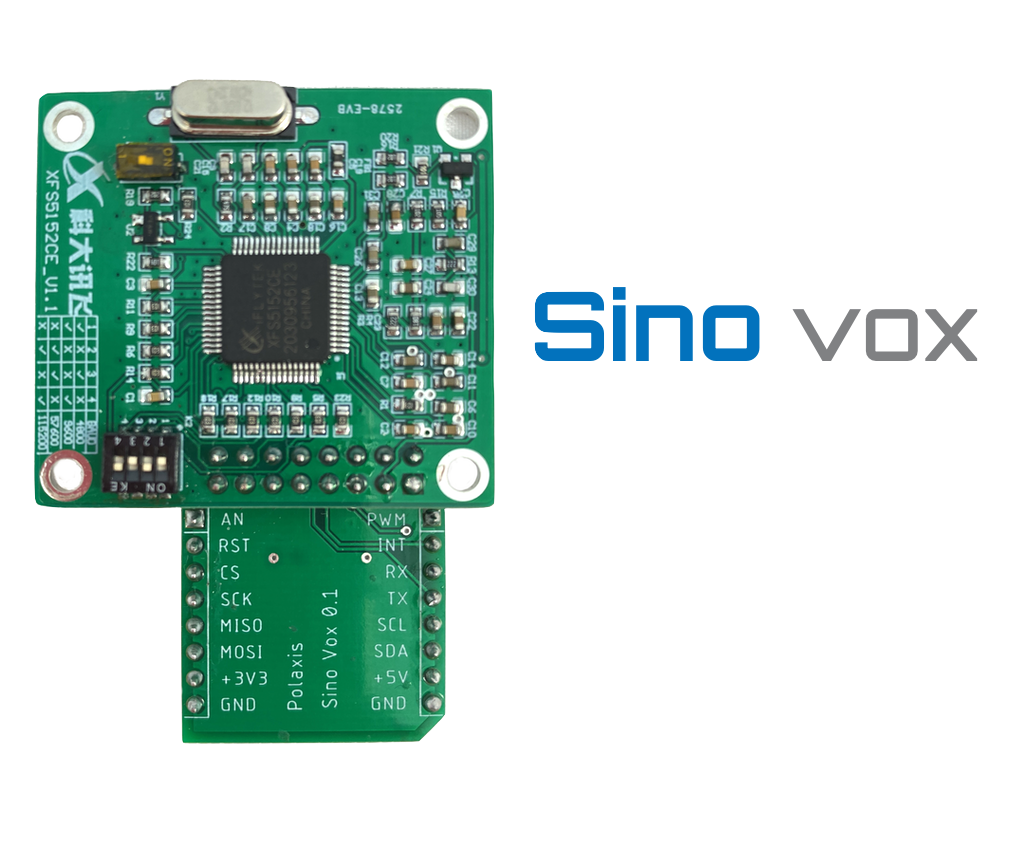
Sino Vox

It generates speech from plain English or Chinese by reading files on the microSD card.

Sino Manual

QR Code

Timing

Real-time
The various voice parameters are applied just before triggering the speech and are ineffective while speaking.
They are applied to the next utterance. The best is to fiddle a bit with the knobs for the desired effects.
While playing with the interface, the display shows the parameters changes.

Firmware

SD card

Here are some text files to test the various voice options (including text in Chinese Pinyin)

MIDI

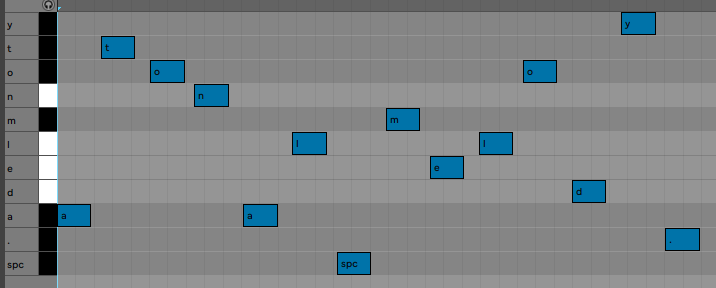
You can use a midi sequencer to store letters as MIDI notes. 

(C#6 is letter a) The speech starts when Sinovox receives the “.” character (MIDI note A#1). The space character is the MIDI note G#0

Pitch bend can be used to set the pitch from 0-10.

The MIDI clock is present on the Busy jack.

You can use a custom MIDI track in Ableton live to ease the process of “typing” text.

Ableton MIDI rack

Media


Voir cette publication sur Instagram


Une publication partagée par Jean-Luc Deladrière (@polaxis)


Voir cette publication sur Instagram


Une publication partagée par Jean-Luc Deladrière (@polaxis)


Voir cette publication sur Instagram


Une publication partagée par Jean-Luc Deladrière (@polaxis)


Voir cette publication sur Instagram


Une publication partagée par Jean-Luc Deladrière (@polaxis)

Jean-Luc Deladrière · Sino Vox


Emy Assembled

TMS5220/TMS5100 speech engine

  • LPC data are read from the SD card so an infinite vocabulary can be loaded
  • Sound and vocabulary can be produced by concatenating allophones and prosody markers from the text file to affect rate, duration, and pitch. No limits here!
  • The OLED crisp display allows browsing amongst the files and the lines within files to pick the sound the user wants to generate.
  • Speech rendering can be tweaked in real-time to affect, rate, stretch, bend, pitch, and energy.
  • All the potentiometers have CV entries attached to them
  • Emy produces sounds in 3 major modes: Speech, Repeat, and VCO.
    • In Speech mode, the speech starts with a gate signal and is completed before waiting for a new gate signal. The speech has priority.
    • In Repeat mode, the speech starts and stops with the gate signal going high or low.
      The gate has the priority, and the speech repeats while the gate is high. This mode is handy to create crazy rhythms.
    • In VCO mode, the LPC engine loops while the gate is high, producing steady notes.

Technical Details

  • 16 hp
  • micro SD card reader to read the text or update the firmware
  • Diode for reverse polarity protection on power lines
  • Consumption : +12V 60mA / -12V 18 mA
  • Cortex-M0 ARM processor
  • All inputs: 100k impedance, 12-bit ADC.
  • CV control designed for  0-5 V entries
  • aux out signal 5V
  • OLED display
  • mikroBUS host
  • Output level 8 Vpp
  • A USB port for communication,  firmware updates, and USB keyboard  text entry

Firmwares

Icon

Emy MIDI Serial 95.37 KB 54509 downloads

This firmware works both on Emy 2018 and 2019 editions. It allows Emy to behave like...
Icon

Emy MIDI USB 79.49 KB 54067 downloads

This firmware works both on Emy 2018 and 2019 editions. It allows Emy to behave like...
Icon

Emy Firmware 65.95 KB 101625 downloads

This firmware is designed for Emy 2019 edition (PCB revision 1.0c). It can run on...
Icon

Emy QC 85.59 KB 102092 downloads

Use this firmware to check Emy after assembly (SD upload compatible) Refer to the...

    SD card

    (if you need to get started with a new sd card)

    Icon

    Emy SD card image 32.99 KB 7403 downloads

    Image of Emy's default SD card. It contains some .lpc files and .phon files to get...

    More files

    MIDI

    The MIDI version of the code (see above in Firmware) works great with this Ableton preset file

    Icon

    Emy Ableton MIDI to allophones effect rack 7.87 KB 34209 downloads

    MIDI notes are renamed so they match Emy's allophones table This makes it easier...

    Manuals

    Emy user manual

    QR Code

    Emy kit assembly manual

    QR Code

    Icon

    Emy 2018 quickstart manual 569.91 KB 283981 downloads

    Have a look at this little quick start manual to get started using the Emy 2018 speech...

    Icon

    Emy 2019 quick start manual 3.78 MB 129795 downloads

    Have a look at this little quick start manual to get started using the Emy 2019 speech...

    Media

    https://www.youtube.com/embed/JkEYwAl6exk

    //platform.instagram.com/en_US/embeds.js

    //platform.instagram.com/en_US/embeds.js

    //platform.instagram.com/en_US/embeds.js

    //platform.instagram.com/en_US/embeds.js


    Mea vox

    Firmware

    Icon

    Mea Firmware + MIDI USB 62.44 KB 418 downloads

     Firmware load : Option 1 Saving the "firmware.bin" on the SD card and restart Option...
    Login is required to access this page

    Icon

    Mea Firmware + MIDI TRS 62.44 KB 16 downloads

     Please note that when using MIDI from the TRS jack on Terminal, the front switch...
    Login is required to access this page

    SD Card

    (if you need to get started with a new SD card)

    Icon

    Mea SD card 1.28 KB 7087 downloads

    Some examples to get you started ... ...


    Extras

    Mea Manual for Emy/Terminal

    QR Code


    MIDI

    The firmware has a MIDI function :

    – MIDI note assigned to 39 phonemes.
    – Velocity and Pitch bend supported.
    – Can hold the note for singing effect.

    Icon

    Ableton MEA vox MIDI effect rack 40 12.07 KB 2557 downloads

    Midi notes are named to match Mea's 40 phonemes. (See MIDI mode in the manual) ...
    Login is required to access this page


    Use with a microcontroller

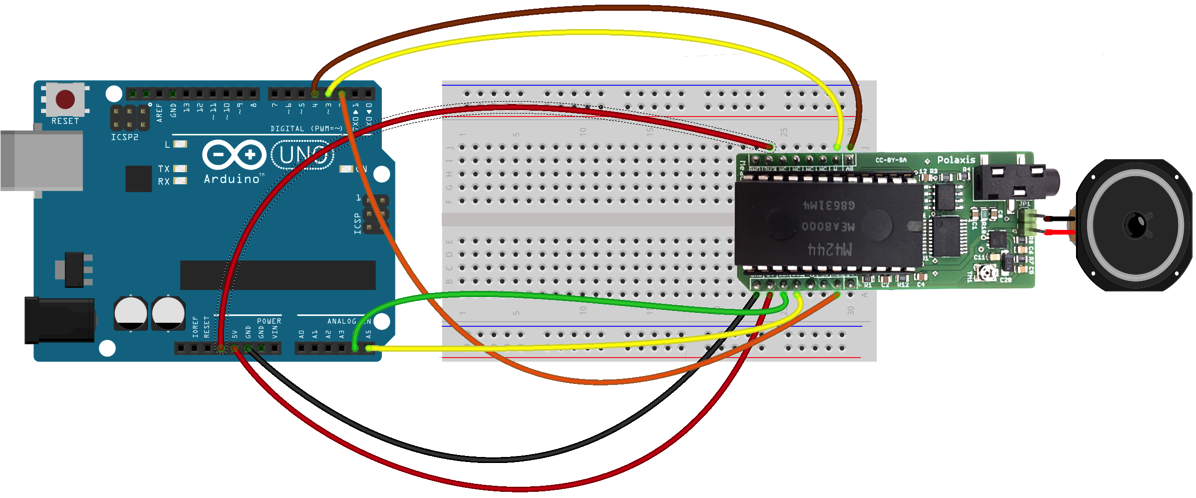
    The hardware is compatible with the mikroBUSTM standard, allowing rapid prototyping and easy integration into existing projects.

    The onboard class-d amplifier can drive a small 8 ohms speaker.

    This vox board was designed to be used with EMY and its appropriate firmware. (in this case, the audio signal is forwarded via the “PWM” pin – the jack is not used with Emy)

    It can also be used in robots, toys, or any other retrocomputing speaking devices you may think of.

    Thanks to the popular mikroBUS™, this board can be instantly connected to multiple different platforms like the Arduino, the STMT32 of the Clicker2.
    The onboard amplifier is quite powerful and is just waiting for the speaker to be plugged in!

    Breadboard Connection

    Arduino Connect

    Code

    The code is available here

    Text to Speech

    The chip can string phonemes to produce quite realistic speech (although with a French accent). It can also sustain notes for a nice singing effect. Here is how the Arduino code looks like :

    dire("/bonj+w_r");
    delay(400);
    dire("&l&kt€Ronik miwzik");
    delay(400);
    dire("i$ b+i-n ka+I+n -ma/$=+_ine");
    delay(400);
    dire("+?je pE ossi murmur*?");
    delay(400);
    dire("je suis un arduino qui parle"); // à corriger ;-)
    delay(400);

    You will find more information about the various phonemes and the prosodic markers in the following manual.

    Hardware User Manual

    Mea hardware manual

    QR Code


    Media


    Voir cette publication sur Instagram


    Une publication partagée par Jean-Luc Deladrière (@polaxis)


    Voir cette publication sur Instagram


    Une publication partagée par Jean-Luc Deladrière (@polaxis)


    Voir cette publication sur Instagram


    Une publication partagée par Jean-Luc Deladrière (@polaxis)


    Jean-Luc Deladrière · MEA