Kaiwa Assembled

Prepare your text file in Romaji and have Kaiwa read it out loud for you!

Just in case you wonder how Romaji look like: here is the Japanese lyrics of Kraftwerk’s Radioactivity :

cherunobuiri
harisuba-gu
serafi-rudo
hiroshi-ma
fukushi-ma
nihon,demo,houshanou
kyoumo,itsumademo
fukushima,houshanou
kuuki,mizu,subete
nihon,demo,houshanou
i-ma--sugu,ya-mero-

note: the hyphen is used to prolong the vowels (see the Kaiwa-vox’s manual for more on this)

Workflow

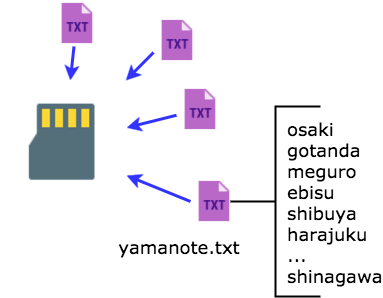
Group your lines into a song and save it as a text file on the SD card :
On Kaiwa, manually pick a song and use the Sound pot or its CV entry to pick the line in that song.
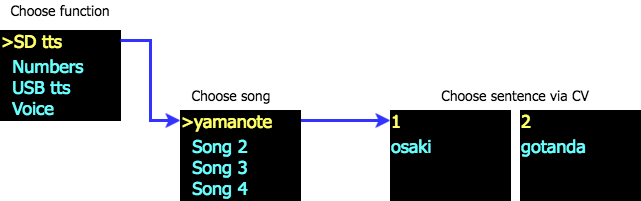
A gate signal will trigger the sound while the various pot and CV entries allow tweaking the voice characteristics before processing the speech (not in real-time, but they are applied on the next utterance).

Kaiwa Manual

QR Code

Firmware

Icon

Kaiwa Firmware 28.03 KB 637 downloads

 Firmware load : Option 1 Saving the "firmware.bin" on the SD card and restart Option...
Login is required to access this page

SD card

(if you need to get started with a new sd card)

Icon

Kaiwa SD card 1.36 KB 9296 downloads

Image of Kaiwa's default SD card. It contains some files to get started Unzip and...

Quickstart Manual

Icon

Kaiwa quickstart manual 658.63 KB 6516 downloads

...

USB TTS mode

This little demo to shows how to use the USB TTS mode on Kaiwa. This function is designed to help you debug your Japanese romaji lines before storing them into a text file for the SD card. (see the user manual for more details).

The speech is triggered by the gate signal, so this mode can also be used to edit and play live text.


Media


Kaiwa vox

Kaiwa Vox is a text-to-speech add-on board with a Japanese robotic voice.
It just needs to receive an ASCII string of Romaji Japanese to start speaking.

The speech engine recognizes text and various speech modifiers to improve prosody.
The chip can also vary the speech’s speed, pitch, and accent.

The hardware is compatible with the mikroBUSTM standard, allowing rapid prototyping and easy integration into existing projects.

The onboard class-d amplifier can drive a small 8-ohms speaker.
A LED turns on when the chip has finished talking and is ready to proceed.

Technical specifications

  • 8 Khz PWM, low pass filtered un-amplified audio output
  • Onboard 1.4W into 8 ohms class-D amplifier
  • 3.5 mm mono jack or 2.54 mm header speaker connections
  • Power by 3.3V or 5V by cutting trace or soldering another (5Vis set by default)
  • Green LED on when ready.
  • Hardware reset signal possible to reset the speech chip

Kaiwa vox hardware manual

QR Code

Kaiwa Manual

QR Code

Applications

This vox board is designed for Emy or Terminal (in this case, the audio signal is routed via the “PWM” pin – the jack is not used here)

It can also be used in robots, toys, or any other speaking device you may think of.

Thanks to the popular mikroBUS™, this board can be connected to multiple platforms like the Arduino or the STM32.
The onboard amplifier is quite powerful and is just waiting for the speaker to be plugged in!

Firmware

Code example

#include "AquesTalk.h"  // http://www.a-quest.com/download/package/Arduino_AquesTalk_Library.zip
#include 

/*

         +-----------------+
         |[ ]NC      OUT[ ]| Audio
       3 |[ ]RST   !PLAY[ ]| 2
         |[ ]NC       NC[ ]|
         |[ ]NC       NC[ ]|
         |[ ]NC      SCL[ ]| A5
         |[ ]NC      SDA[ ]| A4
         |[ ]3V3      5V[ ]| 5V
         |[ ]GND     GND[ ]| GND
         +________________/
*/

AquesTalk atp;  // I2C address : 0x2E
#define RESET 3 
#define NPLAY 2 // busy playing when LOW


void setup()
{
    pinMode(RESET, OUTPUT);
    digitalWrite(RESET, HIGH);
    pinMode(NPLAY,INPUT_PULLUP);
    
  delay(100);
  atp.Synthe("konnnichiwa.");
 
}

void loop()
{  
   atp.Synthe("arigato.");
   atp.SetAccent(random(200));
   atp.SetPitch(random(200));
   atp.SetSpeed(random(200));
   atp.Synthe("."); 

}

Github

The Arduino code is available here.