
Kaiwa, the speech synthesizer with a Japanese robot chip


–
Prepare your text file in Romaji and have Kaiwa read it out loud for you!

Kaiwa is the first sister module based on Emy: add a Kaiwa-vox and a panel to Emy’s core to obtain a brand new module.

Just in case you wonder how Romaji look like: here is the Japanese lyrics of Kraftwerk’s Radioactivity :
cherunobuiri
harisuba-gu
serafi-rudo
hiroshi-ma
fukushi-ma
nihon,demo,houshanou
kyoumo,itsumademo
fukushima,houshanou
kuuki,mizu,subete
nihon,demo,houshanou
i-ma--sugu,ya-mero-
note: the hyphen is used to prolong the vowels (see the Kaiwa-vox’s manual for more on this)
Workflow
Group your lines into a song and save it as a text file on the SD card :

On Kaiwa, manually pick a song and use the Sound pot or it’s CV entry to pick the line in that song.
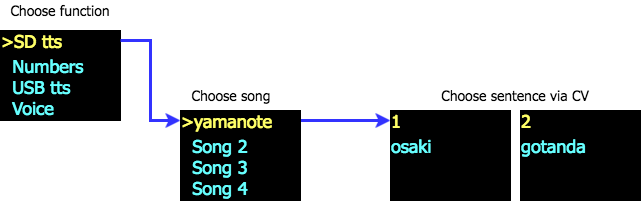
A gate signal will trigger the sound while the various pot and CV entries allow tweaking the voice characteristics before processing the speech (not in real-time, but they are applied on the next utterance).
Kaiwa Manual
Media
Quickstart Manual

USB TTS mode
This little demo to shows how to use the USB TTS mode on Kaiwa. This function is designed to help you debugging your Japanese romaji lines before storing them into a text file for the SD card. (see the user manual for more details).
The speech is triggered by the gate signal, so this mode can also be used to edit and play live text.
Firmware
(to be uploaded with http://www.polaxis.be/bossa-uploader/)

Kaiwa Firmware 28.03 KB 637 downloads
Firmware load : Option 1 Saving the "firmware.bin" on the SD card and restart Option...SD card
(if you need to get started with a new sd card)

