Nexus Vox

Features

  • Converts any ASCII text into speech automatically
  • Real-time control of speed, pitch, voice, reverb, volume

CV control

  • Voices (11)
  • Speed
  • Formant
  • Reverb
  • Expression
  • Pitch (in Phoneme and MIDI mode)

These controls can be applied in real time while speaking!

Inline commands

The text string can contain commands to adjust the voice on the fly

$1o $2s I am Vader and I speak slowly

Phonetic to speech

The speech can also be generated by stringing phonemes and prosody to control the pitch, speed, and volume.

k ax m p yy uw dx er 
Computer

//h aw -/d>/eh r +<\yy uw s p iy k t uw m iy dh ae t -w ey .+/
How dare you speak to me that way!

/ increase pitch. + inscrease speed > increase volume
 decrease pitch. - decrease speed < decrease volume

Phonemes mode

Allows for the easy selection of fundamental phoneme groups, such as “Vowels” and “Consonants,” and provides straightforward controls for pitch and speed adjustments.

While providing fundamental control over pitch and speed, it’s a straightforward function ideal for those just starting their journey in speech synthesis and sound exploration.

This requires just a gate signal to get started…

Latency

From the Gate signal to the start of the speech, the latency is relatively tiny: 30 ms to 80 ms.

MIDI

Full MIDI control over the voice characteristics.
Phonetic, Phoneme or Text to speech from MIDI notes.


Firmware

Text files

Icon

Phonetics 0.32 KB 33 downloads

Check this file showing how to use the phonetics commands Nexus Phoneme Symbols PhonemeExamplePhonemeExample Adas...
Login is required to access this page
Icon

Commands 0.28 KB 28 downloads

Text with embedded commands Nexus commands Use the $ symbol to add a command in your...
Login is required to access this page


    Stand alone

    You can easily connect Nexus to your preferred microcontroller (here the Raspberry Pi Pico) using a simple serial interface.

    Click the image below to learn more


    Media


    Polyglot

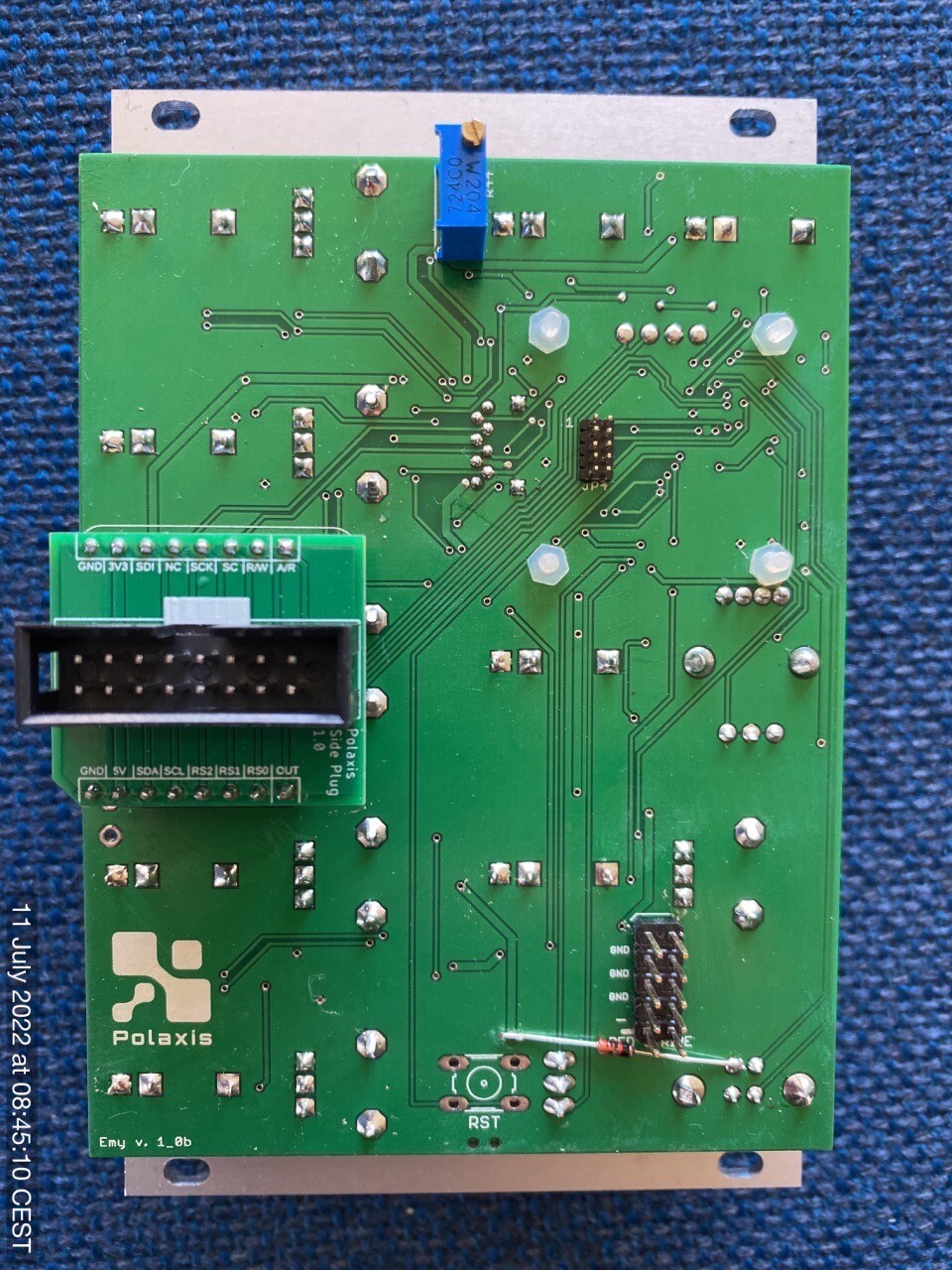
    Please make sure to orient the plug PCB correctly  on EMY with the white marking on the top:


    Polyglot Kit Assembly Procedure


    SPO vox

    This board host the vintage General Instruments SP0256-AL2 aka SPO256-AL2 Narrator. This  IC was very popular in the 1980s.

    The SPO256-AL2 produces all 59 phonemes of the English language. They can be sustained to generate signing.

    It has a very recognizable 8-bit metallic sound.

    These phonemes are individually addressable and can be chained together to create words or small sentences.

    Our board adds two absent functions on the chip: pitch or inflection control and volume control.

    The chip allows looping the last phoneme to generate interesting noise or steady MIDI notes.

    MIDI control

    • MIDI note ON (first phoneme on note 36)
    • MIDI note OFF
    • Pitch Bend (can be used while the note is ON)
    • Velocity
    • Volume CC1 (can be used while the note is ON)

    CV control 

    • Phoneme
    • Volume
    • Pitch


    Custom vocabulary

    Build your own vocabulary by stringing allophones together in the following syntax :

    (note the + marker to extend the duration of the allophone)

    music: MM YY1 UW2 +600 ZZ IH +400 KK1 
    ZERO: ZZ YR OW
    ONE: WW AX AX NN1
    technology: TT1 EH KK1 NN1 AA +100 LL AX +400 JH IY
    electronic: IH IH LL EH KK1 TT1 RR2 AA +200 NN1 IH +200 KK1


    Firmware


    Vocabulary

    135.000 words to get you started …

    Ableton MIDI effect rack

    Media


    FM Radio vox

    Interface

    • Access to your favorite frequencies from the microSD card via the radio.ini file
    • Gate control: seek up to next favorite station on the gate signal
    • Rotary knob: rotate to adjust the frequency
    • Rotary knob: push to seek up to the next station or double click to load your next favorite station
    • CV frequency control for tens, units, and decimals
    • CV control for volume
    • CV control for bass boost
    • CV control for bands (Europe & USA,  Japan & Worldwide)
    • use the switch to set the display mode:
      • up: frequency, station name, RDS data
      • middle: signal intensity Vumeter, frequency
      • low: display OFF (to reduce noise)
    • Use a long press to access the main menu (to load Emy firmware, for example)

    note: the display will enter in screen saver mode after 10 minutes. Just touch anything to wake up.

    Hardware

    Connect a cable as an antenna into the jack connector. (the sleeve is used for the antenna signal).

    Media

    Firmware

    Icon

    FM Radio Firmware 87.52 KB 4875 downloads

     ...

    Source code 

    radio.ini

    Edit this file with your favorite frequencies and place it on the microSD card (keep the name as radio.ini)

    Icon

    Radio.ini 0.05 KB 3036 downloads

    Edit this file with your own favorite frequencies and place it on the microSD card...


    SpeakJet vox

    Firmware


      Quick user instructions

      ⚠️  make sure to orient the module as shown in the image gallery

      Phoneme

      The user can use the rotary to choose a group to play: Vowels/Voiced/Voiced Stop/Voiceless/All Allophone/All Effects/DTMF

      Using the switch position to set the priority to:

      • the gate signal. The gate going high will trigger the speech and it will be stopped with the gate going low (Gate mode). try to play with the duty cycle of the gate or the clock signal.
      • optimized transitioning (Queue mode). Play with the Speed function to fill up the buffer and ear the transition work. The green led and the AUX jack will turn on and off reflecting the buffer half-full status.
      • to the allophone timing itself (Speech mode)

      Number

      There are three modes to generate numbers: CV controlled, Looping or Random.

      SD DIC

      The code will read a phonetic file and allow the user (or the code in the loop and random mode) to choose a line from that file.

      Example of the file content:

      along: \UX \LO \OH \OH \SLOW \NGO
      alpha: \AY \LE \FAST \FF \UX
      alphabet: \AY \LO \FAST \FF \FAST \AX \STRESS \SOFT \BE \EY \SLOW \TT
      already: \AW \LE \FAST \RR \EY \DE \IY
      also: \SLOW \AW \SLOW \LO \SLOW \SO \OWWW
      although: \FAST \OH \SLOW \LO \DH \SLOW \OWWW
      always: \SLOW \AW \LE \WW \EYIY \SLOW \SE

      User control

      The potentiometer P1-P5 affects the pitch, rate, bend, repeat, and volume.

      While playing with the interface, the display contextually shows the information about the changes made (rotary, switch, and potentiometers)

      A long click brings the user back to the main menu.

      A double click in the SD DIC mode brings the user to the file selection menu.

      There is a screen saver that will activate after 10 minutes. Turn the rotary to reactivate the display. 

      Midi control

      • Channel filter
      • MIDI note ON to play a phoneme
      • Velocity
      • Pitch
      • Speed (CC 5 – Portamento time)
      • Bend (CC1 -Modulation)

      SD Card

      Here are some files to get you started  …

      Phonetic files

      Some dictionnaries to help you building your own speech files


        Ableton MIDI Effect Rack

        You can also sequence the chip by sending phonemes from the piano roll 


        Media


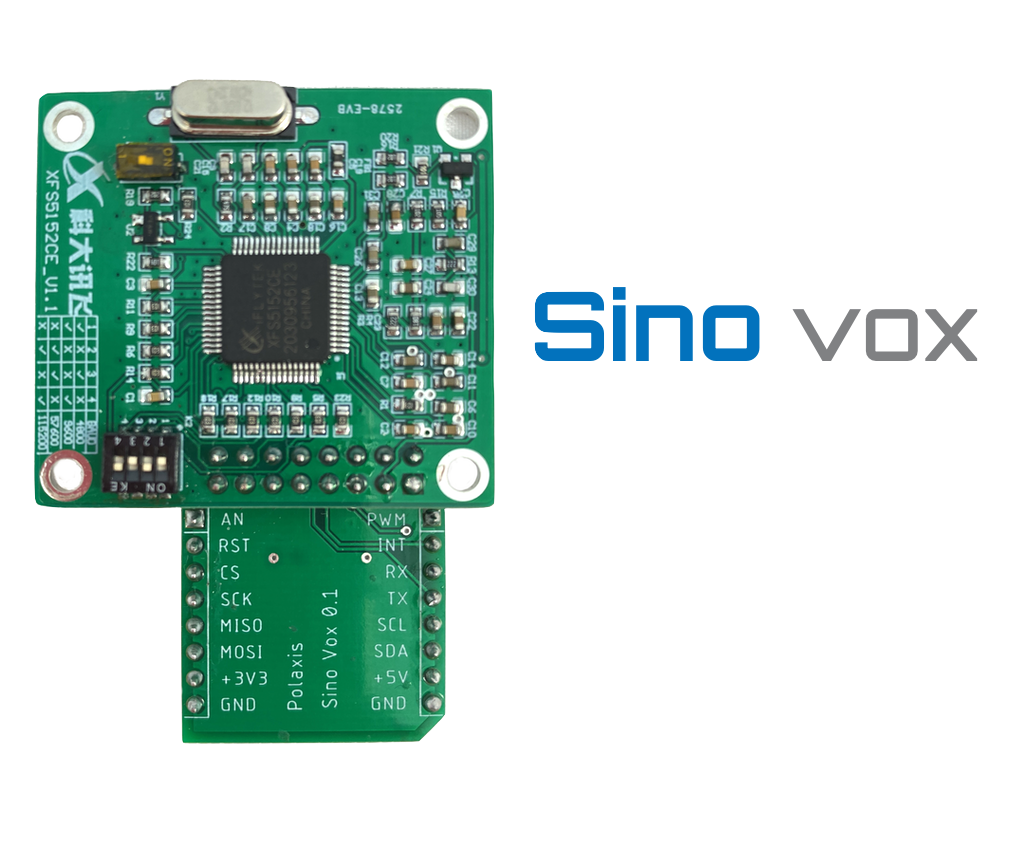
        Sino Vox

        It generates speech from plain English or Chinese by reading files on the microSD card.

        Timing

        Real-time
        The various voice parameters are applied just before triggering the speech and are ineffective while speaking.
        They are applied to the next utterance. The best is to fiddle a bit with the knobs for the desired effects.
        While playing with the interface, the display shows the parameters changes.

        Firmware

        SD card

        Here are some text files to test the various voice options (including text in Chinese Pinyin)

        MIDI

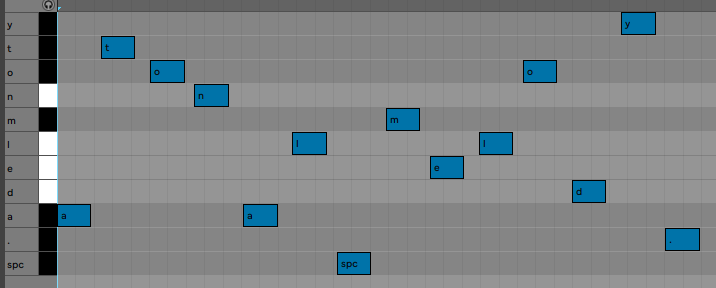
        You can use a midi sequencer to store letters as MIDI notes. 

        (C#6 is letter a) The speech starts when Sinovox receives the “.” character (MIDI note A#1). The space character is the MIDI note G#0

        Pitch bend can be used to set the pitch from 0-10.

        The MIDI clock is present on the Busy jack.

        You can use a custom MIDI track in Ableton live to ease the process of “typing” text.

        Ableton MIDI rack

        Media


        Voir cette publication sur Instagram


        Une publication partagée par Jean-Luc Deladrière (@polaxis)


        Voir cette publication sur Instagram


        Une publication partagée par Jean-Luc Deladrière (@polaxis)


        Voir cette publication sur Instagram


        Une publication partagée par Jean-Luc Deladrière (@polaxis)


        Voir cette publication sur Instagram


        Une publication partagée par Jean-Luc Deladrière (@polaxis)

        Jean-Luc Deladrière · Sino Vox


        Robovox

        Robovox’s design is inspired by the Patent “System for and method of synthesizing singing in real-time”  filed on 03.05.90 by Florian Schneider, Gert Joachim Ott, and Gert Jalass.

        It describes a musical instrument that can produce a speech and sing in real-time via MIDI controls.
        A magical speech synthesizer chip lives at the heart of the instrument: the Votrax SC-02 invented by Richard T. Gagnon.
        The Votrax SC-02 chip can generate speech by stringing phonemes together.
        The Votrax SC-02 contains registers that allow software control of the speech rate, pitch, pitch movement rate, amplitude, articulation rate, vocal tract filter, and of course, phoneme selection.
        Most of these functions are implemented in the MIDI control software.

        In Robovox, we also implemented an undocumented function of the chip: the internal audio carrier can be replaced by an external one to produce vocoder-like effects.
        The result is simply excellent.  You can also use this feature as an effect to apply to the carrier! Check this demo where I play with the pitch of the external carrier with a Genki ring (@ 0:48) (sorry for the lousy audio -video sync) 


        Specifications

        Hardware

        • Add-on board to fit on KraftorEmy or Emy Terminal via the MikroBUS port
        • Host the vintage SC-02 Votrax speech chip
        • Audio carrier input for vocoder like effect

        Midi controls

        • MIDI note ON note OFF mapped to the SC02’s phonemes
        • Velocity
        • Pitch (coarse control by clocking the chip)
        • CC2 Note Pitch (fine control using the chip inflection/pitch register)
        • Mod Wheel mapped to filter
        • CC 64 sustain ON/OFF to choose between the internal and external carrier

        Emy / Terminal EMY Firmware

        The code runs on Terminal or Emy. It comes in 2 versions, depending on how you want to sequence it. You can drive it either as a USB MIDI instrument or via a classic MIDI serial TRS connector. The code also allows CV controls so it can be used in a Eurorack setting


        Sequencing the chip

        VST-Plugin

        The chip is quite easy to sequence with the help of a plugin that works almost like the original Atari software used by Kraftwerk.

        Ableton MIDI Effect Rack

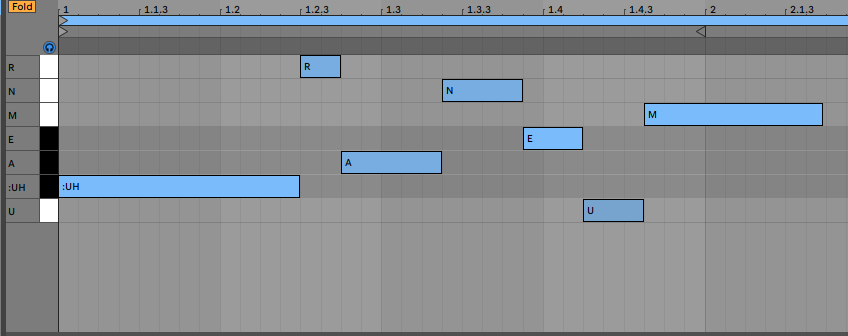
        You can also sequence the chip by sending phonemes from the piano roll (here: UH R A N E U M )

        I made a MIDI effect rack for Ableton to simplify the introduction of text

        Media

        Here are a few Kraftwerk covers made by Andrew Shaw. These are astonishing variants of the original ones: respectful to the original songs but with their specificities or identities.

        Andrew is using the Robovox precisely as Kraftwerk used to do: first by finding the correct phonemes to be uttered, then launching them in perfect timing and duration, and finally tuning the pitch to have the chip sing in tune!
        ( all parameters sent live to the Robovox from within the DAW)


        Jean-Luc Deladrière · Robovox


        VAX vox

        What is Dectalk

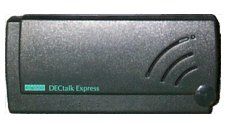
        Dectalk was a speech synthesizer and text-to-speech technology developed by Digital Equipment Corporation in 1984, mainly based on the work of Dennis Klatt at MIT.

        The Dectalk Express what connected to the serial port and would speak what was being “printed.”

        Dectalk Express

        The synthesizer can process text and produce speech with nine different voices. The Dectalk engine includes a parser that gives users fine control over the synthesized speech’s quality, pitch, and intonation. Dectalk can also be programmed to play phonemes and sing with quite a realistic expression.

        [hxae<300,10>piy<300,10> brr<600,12>th<100>dey<600,10> tuw<600,15> yu<1200,14>_<120>]
        [hxae<300,10>piy<300,10> brr<600,12>th<100>dey<600,10> tuw<600,17> yu<1200,15>_<120>]
        [hxae<300,10>piy<300,10> brr<600,22>th<100>dey<600,19>xdih<600,15>rdeh<600,14>ktao<600,12>k_<120>_<120>]
        [hxae<300,20>piy<300,20> brr<600,19>th<100>dey<600,15> tuw<600,17> yu<1200,15>]

        The command syntax for musical coding sequences is:

        [phoneme<duration, pitch number

        Timing

        Latency
        There is a latency of 200 ms between the trigger and the start of the speech. This latency is very consistent, allowing the speech to stay in the tempo even if not precisely on the beat. The firmware uses the gate going down to stop the speech, preparing the chip for the next utterance, so when sequencing some stutter-like speech in a loop, they still fire up in sync with the tempo.

        Real-time
        The various voice parameters are applied just before triggering the speech and are ineffective while speaking. They are applied to the next utterance. The best is to fiddle a bit with the knobs for the desired effects.


        Firmware

        Icon

        Vax Firmware 82.59 KB 11993 downloads

        <iframe src="https://docs.google.com/spreadsheets/d/e/2PACX-1vRFPTD7IZa6LTllEF1t8CG9W-ElWvVldzN8lV7fzbhOAP0ufKlmD3N8Zy6aMXTGe_iwAE3ItMIzO_xz/pubhtml?gid=1359627519&single=true&widget=true&headers=false" width="600"...


        Icon

        DECtalk user guide 1.08 MB 7885 downloads

        A very useful guide to help you using the DECtalk command and building your own very...

        Text files

        Icon

        Apollo 11 complete transcript 709.93 KB 8104 downloads

        Credits here I modified the script so the various callsigns use differents DECtalk...
        Icon

        Long text 73.41 KB 9385 downloads

        These text files with a .spk are to be read by the SD reader mode in VAX. The text...
        Icon

        Singing demo 0.61 KB 5642 downloads

        ...
        Icon

        Designing Voices 0.73 KB 4872 downloads

        Load this file to learn how to design your own voices by tweaking the various voice...
        Icon

        Spell mode demo 2.71 KB 7675 downloads

        2 files to show how to use the spell mode : one with a list of  three letter acronym...
        Icon

        Isaac Asimov's "Three Laws of Robotics" - pseudo singing mode demo 0.00 KB 42 downloads

        Isaac Asimov's "Three Laws of Robotics" First 3 lines in normal text to speech mode,...
        Icon

        Oblique Strategies 3.58 KB 5925 downloads

        Brian Eno's Oblique Strategies Original 1975  version (113 lines) ...

          Songs

          Icon

          Songs 3.89 KB 7850 downloads

          A few songs to play with VAX ... Daisy Imperial March The Star-Spangled Banner USSR...

            Media


            Mea vox

            Firmware

            Icon

            Mea Firmware + MIDI USB 62.44 KB 418 downloads

             Firmware load : Option 1 Saving the "firmware.bin" on the SD card and restart Option...
            Login is required to access this page

            Icon

            Mea Firmware + MIDI TRS 62.44 KB 16 downloads

             Please note that when using MIDI from the TRS jack on Terminal, the front switch...
            Login is required to access this page

            SD Card

            (if you need to get started with a new SD card)

            Icon

            Mea SD card 1.28 KB 6885 downloads

            Some examples to get you started ... ...


            Extras


            MIDI

            The firmware has a MIDI function :

            – MIDI note assigned to 39 phonemes.
            – Velocity and Pitch bend supported.
            – Can hold the note for singing effect.

            Icon

            Ableton MEA vox MIDI effect rack 40 12.07 KB 2557 downloads

            Midi notes are named to match Mea's 40 phonemes. (See MIDI mode in the manual) ...
            Login is required to access this page


            Use with a microcontroller

            The hardware is compatible with the mikroBUSTM standard, allowing rapid prototyping and easy integration into existing projects.

            The onboard class-d amplifier can drive a small 8 ohms speaker.

            This vox board was designed to be used with EMY and its appropriate firmware. (in this case, the audio signal is forwarded via the “PWM” pin – the jack is not used with Emy)

            It can also be used in robots, toys, or any other retrocomputing speaking devices you may think of.

            Thanks to the popular mikroBUS™, this board can be instantly connected to multiple different platforms like the Arduino, the STMT32 of the Clicker2.
            The onboard amplifier is quite powerful and is just waiting for the speaker to be plugged in!

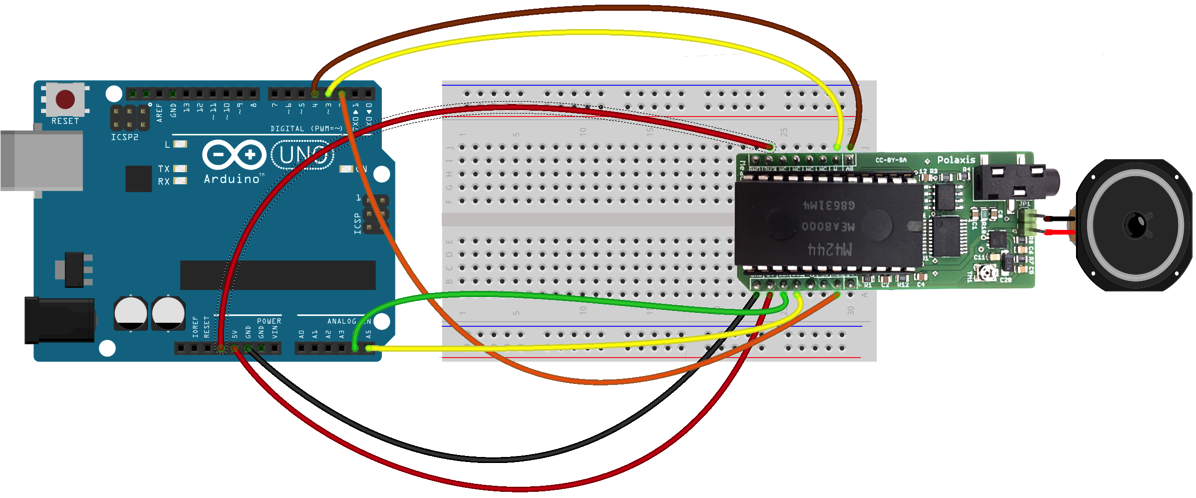
            Breadboard Connection

            Arduino Connect

            Code

            The code is available here

            Text to Speech

            The chip can string phonemes to produce quite realistic speech (although with a French accent). It can also sustain notes for a nice singing effect. Here is how the Arduino code looks like :

            dire("/bonj+w_r");
            delay(400);
            dire("&l&kt€Ronik miwzik");
            delay(400);
            dire("i$ b+i-n ka+I+n -ma/$=+_ine");
            delay(400);
            dire("+?je pE ossi murmur*?");
            delay(400);
            dire("je suis un arduino qui parle"); // à corriger ;-)
            delay(400);

            You will find more information about the various phonemes and the prosodic markers in the following manual.

            Hardware User Manual


            Media


            Voir cette publication sur Instagram


            Une publication partagée par Jean-Luc Deladrière (@polaxis)


            Voir cette publication sur Instagram


            Une publication partagée par Jean-Luc Deladrière (@polaxis)


            Voir cette publication sur Instagram


            Une publication partagée par Jean-Luc Deladrière (@polaxis)


            Jean-Luc Deladrière · MEA


            Kaiwa vox

            Kaiwa Vox is a text-to-speech add-on board with a Japanese robotic voice.
            It just needs to receive an ASCII string of Romaji Japanese to start speaking.

            The speech engine recognizes text and various speech modifiers to improve prosody.
            The chip can also vary the speech’s speed, pitch, and accent.

            The hardware is compatible with the mikroBUSTM standard, allowing rapid prototyping and easy integration into existing projects.

            The onboard class-d amplifier can drive a small 8-ohms speaker.
            A LED turns on when the chip has finished talking and is ready to proceed.

            Technical specifications

            • 8 Khz PWM, low pass filtered un-amplified audio output
            • Onboard 1.4W into 8 ohms class-D amplifier
            • 3.5 mm mono jack or 2.54 mm header speaker connections
            • Power by 3.3V or 5V by cutting trace or soldering another (5Vis set by default)
            • Green LED on when ready.
            • Hardware reset signal possible to reset the speech chip

            Applications

            This vox board is designed for Emy or Terminal (in this case, the audio signal is routed via the “PWM” pin – the jack is not used here)

            It can also be used in robots, toys, or any other speaking device you may think of.

            Thanks to the popular mikroBUS™, this board can be connected to multiple platforms like the Arduino or the STM32.
            The onboard amplifier is quite powerful and is just waiting for the speaker to be plugged in!

            Firmware

            Code example

            #include "AquesTalk.h"  // http://www.a-quest.com/download/package/Arduino_AquesTalk_Library.zip
            #include 
            
            /*
            
                     +-----------------+
                     |[ ]NC      OUT[ ]| Audio
                   3 |[ ]RST   !PLAY[ ]| 2
                     |[ ]NC       NC[ ]|
                     |[ ]NC       NC[ ]|
                     |[ ]NC      SCL[ ]| A5
                     |[ ]NC      SDA[ ]| A4
                     |[ ]3V3      5V[ ]| 5V
                     |[ ]GND     GND[ ]| GND
                     +________________/
            */
            
            AquesTalk atp;  // I2C address : 0x2E
            #define RESET 3 
            #define NPLAY 2 // busy playing when LOW


            void setup()
            {
                pinMode(RESET, OUTPUT);
                digitalWrite(RESET, HIGH);
                pinMode(NPLAY,INPUT_PULLUP);
                
              delay(100);
              atp.Synthe("konnnichiwa.");
             
            }
            
            void loop()
            {  
               atp.Synthe("arigato.");
               atp.SetAccent(random(200));
               atp.SetPitch(random(200));
               atp.SetSpeed(random(200));
               atp.Synthe("."); 
            
            }

            Github

            The Arduino code is available here.