Polyglot
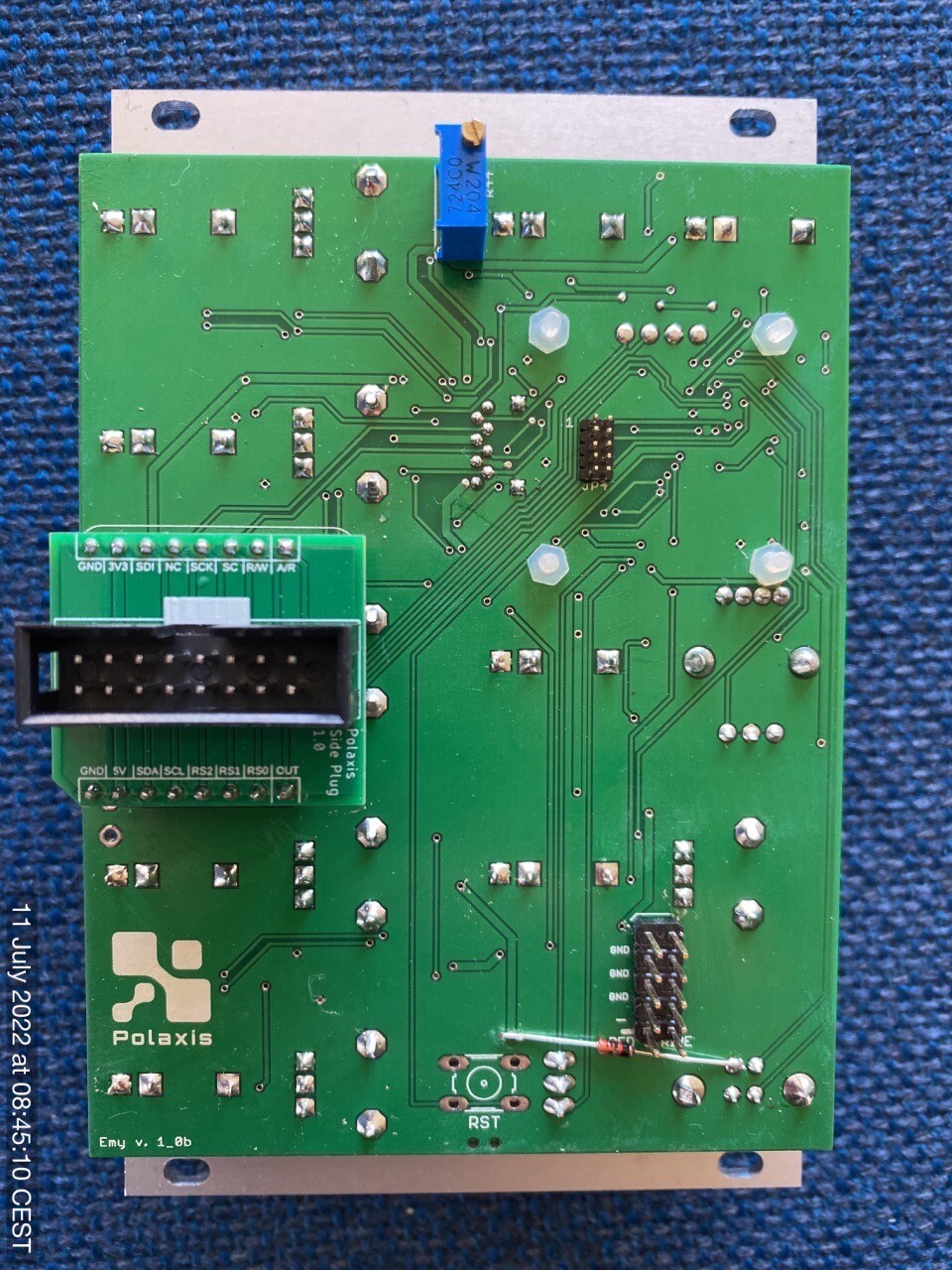
Please make sure to orient the plug PCB correctly on EMY with the white marking on the top:
Polyglot Kit Assembly Procedure
Please make sure to orient the plug PCB correctly on EMY with the white marking on the top:
Polyglot Kit Assembly Procedure
This module is performing real-time LPC synthesis to produce intelligible voice or … not if you choose to.
The module produces sounds in 3 major modes : Speech, Repeat and VCO.
Talko is an Arduino-based synthesiser developed under open-source hardware and software. (license CC-BY-SA)
Its firmware can be updated via the onboard USB port.
Please note that building & coding this module requires minimum Arduino knowledge like installing a com port, installing libraries & uploading code.
– format: Eurorack
– width: 10hp
– depth: 30 mm skiff friendly
– power: + 12V: 65 mA via 10 pin Doepfer power bus
– audio : un-filtered 5V PWM carrier at 62500 Hz
– inputs: protected against over or under voltage by clipping from 0 to +5V
The kit contains everything you need to build your own Talko 1.2 : the panel, the PCB, the components, the knobs and the power cable.
The kits include a populated PCB with all SMD installed .
The bootloader is already flashed to the ATmega338p.
The assembly manual can be found here : https://github.com/deladriere/euro-modules/wiki/Assemble-Talko
The user manual can be found here : https://www.polaxis.be/wp-content/uploads/2016/05/Talko-Manual-1_2.pdf
https://github.com/deladriere/euro-modules/tree/master/Talko
Assembly Manual :
https://docs.google.com/document/d/1YqtZGcR0a9y3dSaS41rJ2dpXWgq_nbGpbouSVJeHrYA/edit?usp=sharing
Quickstart manual: https://www.polaxis.be/download/kaiwa-quickstart-manual/
For more information, check the assembled Kaiwa
See the assembly manual
Prepare your text file in Romaji and have Kaiwa read it out loud for you!
Just in case you wonder how Romaji look like: here is the Japanese lyrics of Kraftwerk’s Radioactivity :
cherunobuiri
harisuba-gu
serafi-rudo
hiroshi-ma
fukushi-ma
nihon,demo,houshanou
kyoumo,itsumademo
fukushima,houshanou
kuuki,mizu,subete
nihon,demo,houshanou
i-ma--sugu,ya-mero-
note: the hyphen is used to prolong the vowels (see the Kaiwa-vox’s manual for more on this)
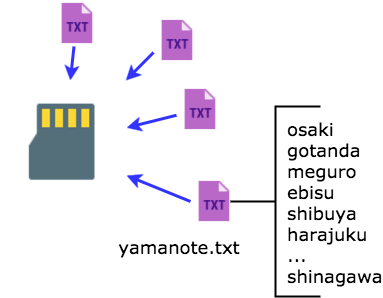
Group your lines into a song and save it as a text file on the SD card :
On Kaiwa, manually pick a song and use the Sound pot or its CV entry to pick the line in that song.
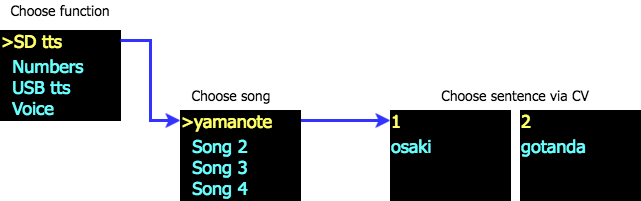
A gate signal will trigger the sound while the various pot and CV entries allow tweaking the voice characteristics before processing the speech (not in real-time, but they are applied on the next utterance).

(if you need to get started with a new sd card)

This little demo to shows how to use the USB TTS mode on Kaiwa. This function is designed to help you debug your Japanese romaji lines before storing them into a text file for the SD card. (see the user manual for more details).
The speech is triggered by the gate signal, so this mode can also be used to edit and play live text.
(if you need to get started with a new sd card)
The MIDI version of the code (see above in Firmware) works great with this Ableton preset file


https://www.youtube.com/embed/JkEYwAl6exk
//platform.instagram.com/en_US/embeds.js
//platform.instagram.com/en_US/embeds.js
This module is performing real-time LPC synthesis to produce an intelligible voice or … not if you choose to.
The module produces sounds in 3 major modes: Speech, Repeat, and VCO.
Talko is an Arduino-based synthesizer developed under open-source hardware and software. (license CC-BY-SA)
Its firmware can be updated via the onboard USB port.
Please note that building & coding this module requires minimum Arduino knowledge like installing a com port, installing libraries & uploading code.
– format: Eurorack
– width: 10hp
– depth: 30 mm skiff friendly
– power: + 12V: 65 mA via 10 pin Doepfer power bus
– audio: un-filtered 5V PWM carrier at 62500 Hz
– inputs: protected against over or under voltage by clipping from 0 to +5V
The user manual can be found here: https://www.polaxis.be/wp-content/uploads/2016/05/Talko-Manual-1_2.pdf
https://github.com/deladriere/euro-modules/tree/master/Talko

